Grok Voice 3.0 is built for natural speech, not necessarily musical singing. If you have tried asking Grok to sing a song and received something that sounds more like spoken narration than a melody, you have encountered an important distinction between AI voice generation and AI music generation.
The good news is that you do not need a professional recording studio to turn a spoken idea, a set of lyrics, or even a short voice recording into a song. By combining voice recording, audio editing, and an AI music generator such as AIMusicMaker.org, you can build a practical workflow for creating music from almost any starting point.
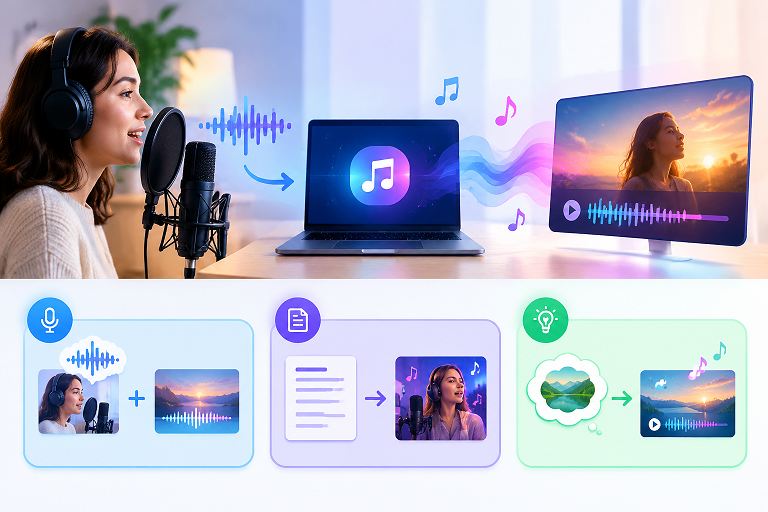
In this guide, we will explain what Grok Voice 3.0 does, what its singing capabilities actually mean, and three ways to turn a voice or an idea into a musical track.
1. What Is Grok Voice 3.0?
Grok Voice 3.0 is xAI's speech-to-speech model, announced on October 14, 2026. It is designed to understand spoken input and produce natural, responsive speech in real-time conversations.
According to xAI's announcement, the model focuses on conversational accuracy, natural turn-taking, low latency, and speech reasoning. Its reported benchmark results include an 86.9 score on Artificial Analysis's Speech-to-Speech Index.
These capabilities make Grok Voice 3.0 useful for applications such as:
- Voice conversations: Responding naturally to spoken questions.
- Voice assistants: Powering interactive assistants and customer support agents.
- Spoken content: Generating expressive speech for applications and digital products.
- Multilingual communication: Supporting voice interactions across languages.
- Custom voice experiences: Using available voice tools to create more consistent vocal identities.
However, there is a crucial distinction: a speech model is not the same thing as a singing voice model.
Speaking and singing require different kinds of audio generation. Speech prioritizes understandable words, conversational rhythm, and natural intonation. Singing requires sustained pitches, deliberate melodic movement, musical timing, and coordination with an instrumental arrangement.
A model that excels at speech does not automatically produce convincing melodies.
That is why asking Grok to sing a complete pop song may not produce the results you expect. The better approach is to use the right tool for each stage of the creative process.
2. How Well Can Grok Voice 3.0 Sing?
The short answer is that its speech capabilities should not be treated as proof of full singing capability.
There is an important difference between making a voice sound expressive and making it sing a melody.
What it can help you create
Depending on the interface and tools you use, a speech-oriented model can help with:
- Spoken introductions for songs.
- Emotional narration and dramatic voiceovers.
- Spoken-word performances and rhythmic delivery.
- Draft lyrics, song concepts, and creative prompts.
- Voice references for a broader music-production workflow.
These are useful building blocks, but they are not equivalent to a fully produced song.
What makes singing difficult?
A convincing vocal performance usually requires several elements to work together:
- Pitch control: Notes must follow a recognizable melody rather than ordinary speech intonation.
- Musical timing: Syllables must align with the beat and musical phrasing.
- Sustained notes: Vowels need to continue smoothly across longer notes.
- Vocal expression: The performance needs appropriate dynamics, emphasis, and emotion.
- Musical arrangement: The vocals must fit the tempo, harmony, and instrumental backing.
Even if an AI voice sounds expressive, it may struggle with one or more of these requirements.
Also, publicly reported speech benchmarks do not establish how well a model sings. Without a dedicated singing benchmark or a verified singing demonstration, it would be misleading to assign Grok Voice 3.0 a specific singing quality score.
The practical solution: Separate the voice from the music
Instead of forcing a speech model to do everything, divide the task into manageable stages.
- Use Grok for spoken content, brainstorming, or dialogue where appropriate.
- Use a voice recorder or audio editor to prepare a clean vocal reference.
- Use an AI music generator to create melodies, vocals, and instrumental arrangements.
- Combine and refine the results in an audio editor when necessary.
This leads to three useful workflows, depending on what you already have.
3. Workflow A: Voiceover + Background Music
Best for: YouTube videos, podcasts, tutorials, short-form videos, presentations, and promotional content.
If your goal is to make a voice recording sound more musical without replacing the spoken words with sung vocals, this is the easiest place to start.
You do not need to turn every voice into a song. Sometimes a good voiceover with carefully arranged background music creates a more professional result.
Step 1: Prepare your voice recording
Record your narration or generate the spoken audio with a suitable voice tool.
For the cleanest results:
- Record in a quiet environment.
- Speak at a consistent volume.
- Avoid excessive background noise.
- Leave small pauses between major sections.
- Export the recording in a format your audio editor supports.
If you already have a recording from Grok or another voice tool, use that as your starting point.
Step 2: Create matching background music
Visit AIMusicMaker Guide and use its available music-generation features to explore an instrumental track suited to your content.
Describe the atmosphere, instruments, and energy you want. For example:
Example prompt:
Create a warm, cinematic instrumental background for an inspiring technology video. Use soft piano, gentle electronic textures, subtle percussion, and a gradual build. Keep the arrangement uncluttered so spoken narration remains clear. No vocals.
You can change the mood according to your project:
- Relaxing: Soft piano, ambient pads, and gentle textures.
- Energetic: Upbeat drums, bass, and bright synths.
- Emotional: Piano, strings, and a gradual crescendo.
- Professional: Minimal electronic music with a restrained rhythm.
Step 3: Mix the voice and music
Import both audio files into an audio editor.
Place the voice on one track and the instrumental on another. Keep the background music quieter than the narration, and lower it further when important information is being spoken.
You can also use volume automation, fades, and light compression to improve consistency.
Step 4: Export your finished audio
Listen to the complete result using headphones and ordinary speakers. Check that the voice remains understandable and that the music does not become distracting.
Export the final audio and combine it with your video or other content.
Result: A polished voiceover with a custom musical background, without requiring Grok itself to sing.
4. Workflow B: Lyrics → Singing
Best for: People who already have lyrics and want to hear them performed as a real song.
If your goal is to turn written words into singing rather than spoken narration, use a dedicated AI song-generation workflow.
The essential difference is that the system needs to generate a melody and vocal performance, not simply read your text aloud.
Step 1: Write or prepare your lyrics
You can write the lyrics yourself, use an AI assistant to brainstorm them, or refine an existing draft.
Organize the lyrics into sections such as:
- Verse 1
- Pre-chorus
- Chorus
- Verse 2
- Bridge
- Final chorus
Not every song needs all six sections. A short song for a social media video may need only a verse and a memorable chorus.
For example:
Verse
We chased the lights across the sky,
Through every storm, we learned to fly.
Chorus
Keep the fire burning bright,
We are rising through the night.
These are original example lyrics. Their short lines and repeated imagery give a music generator a clearer structure to work with.
Step 2: Choose a musical direction
Before generating the song, decide what kind of performance you want.
Consider specifying:
- Genre: Pop, rock, folk, R&B, country, or electronic.
- Mood: Hopeful, romantic, nostalgic, dramatic, or playful.
- Tempo: Slow ballad, mid-tempo pop, or fast dance music.
- Vocal style: Soft female vocal, warm male vocal, duet, or group chorus.
- Arrangement: Acoustic guitar, piano, full band, synthesizers, or orchestral backing.
For example:
An uplifting pop song with a warm female lead vocal, a memorable chorus, acoustic guitar, modern drums, and a gradual build. Medium tempo, clear English lyrics, and a hopeful ending.
Step 3: Generate the song
Open AIMusicMaker.org and look for the available song-generation or lyrics-to-music workflow.
Enter your lyrics, select the relevant style settings if available, and generate a version.
Listen for three things:
- Are the words pronounced clearly?
- Does the melody sound natural and memorable?
- Does the vocal performance fit the instrumental arrangement?
If the result is not quite right, shorten overly complicated lines, clarify the style, or adjust the chorus and regenerate.
Step 4: Refine the vocal performance
AI-generated singing may still produce awkward syllable timing, unexpected pronunciation, or melodies that do not match your intention.
Try making small changes rather than rewriting everything at once.
For example, if a lyric feels rushed, shorten the line. If the chorus lacks energy, request a stronger vocal delivery and a fuller arrangement. If the song sounds too busy, simplify the instrumentation.
Step 5: Export and use your song
Once you have a version you like, export it using the options available on the platform.
You can then use it for a personal music project, a video soundtrack, a podcast intro, or another creative project, subject to the platform's current terms and any applicable rights requirements.
Result: Written lyrics become a complete musical performance with melody, singing, and accompaniment, rather than a spoken reading.
5. Workflow C: Idea → Song
Best for: Beginners, creators without lyrics, personalized songs, music experiments, and people who have a musical idea but cannot play an instrument.
This is the most flexible workflow because you do not need a finished script or recording. You start with an idea and let an AI music generator help turn it into a complete track.
Your starting point could be a feeling, a short story, a personal message, a video concept, or a few keywords.
Step 1: Describe the idea
Start with a simple concept.
For example:
A nostalgic song about two friends who grew up together, moved to different cities, and promised to meet again.
You do not need to write lyrics yet. Focus on the story and emotional direction.
Step 2: Turn the idea into a detailed music prompt
A useful prompt describes the subject, mood, genre, vocals, and arrangement.
For example:
Create an emotional indie-pop song about childhood friends separated by distance but still connected by their memories. Use warm male vocals, gentle acoustic guitar, atmospheric piano, a steady mid-tempo beat, and a powerful, uplifting chorus. Begin intimately and build toward an emotional final section.
A clear prompt gives the generator a better creative direction than a vague instruction such as "make a good song."
Step 3: Generate a first version
Use the text-to-music or song-generation feature available on AIMusicMaker.org.
Depending on the available settings, you may be able to generate a complete song directly from your description or develop the idea through separate lyric and music stages.
Listen to the first version before making further changes.
Step 4: Improve the song one element at a time
Treat the first output as a draft.
If the lyrics are too generic, add more specific details to your story. If the mood is wrong, describe the intended emotion more precisely. If the arrangement is too heavy, request a simpler instrumental style.
Here are a few targeted revisions:
- For a stronger chorus: Ask for a memorable hook with a repeated central phrase.
- For a more personal song: Include a specific memory, place, or message.
- For a calmer track: Request fewer drums, softer vocals, and a sparse arrangement.
- For a more cinematic sound: Ask for a gradual build, layered strings, and a dramatic ending.
Changing one or two elements at a time makes it easier to identify what improves the result.
Step 5: Create variations for different uses
One idea can become several musical versions.
For instance, the same story could become:
- A soft acoustic ballad.
- An upbeat pop song.
- A cinematic soundtrack.
- A short, catchy social media track.
- An instrumental version for a video.
Generate variations when the platform supports them, then select the version that best fits your intended audience.
Result: A rough idea becomes an original song concept, potentially including lyrics, vocals, melody, and instrumental accompaniment, without needing to produce each component manually.
6. Comparison Table: Which Workflow Should You Choose?
The best workflow depends on what you already have and what you want the finished audio to sound like.
| Feature | Workflow A: Voice + Music | Workflow B: Lyrics → Singing | Workflow C: Idea → Song |
|---|---|---|---|
| Starting material | Voice recording | Written lyrics | Idea or short description |
| Main goal | Enhance spoken audio | Turn lyrics into a sung performance | Create a song from scratch |
| Singing required | No | Yes | Usually, if you request vocals |
| Music generation | Background instrumental | Melody and accompaniment | Music and potentially lyrics and vocals |
| Creative control | Voice and music balance | Lyrics and vocal style | Concept, genre, mood, and arrangement |
| Best for | Podcasts and video narration | Songwriters and lyricists | Beginners and creative experiments |
| Main limitation | Voice remains spoken | Lyrics may need editing | Less precise control over the first draft |
Grok Voice 3.0 vs. an AI Music Maker
| Capability | Grok Voice 3.0 | AI music generator |
|---|---|---|
| Natural speech | Primary purpose | Depends on the tool |
| Real-time voice interaction | Designed for it | Usually not the main purpose |
| Generate melodies | Not established as a core capability | A common music-generation feature |
| Sing complete lyrics | Do not assume this is supported | Available in singing-focused tools |
| Create instrumental tracks | Not its primary purpose | Commonly supported |
| Best role in this workflow | Spoken voice and creative assistance | Music composition and song generation |
These are comparisons of intended capabilities, not claims that every tool has identical features. Check the current feature list and available generation settings before choosing a workflow.
Final Thoughts
Grok Voice 3.0 represents an advance in AI speech, but natural speech and convincing singing are different technical challenges. If you want a spoken introduction with music, combine a voice recording with an instrumental track. If you already have lyrics, use a singing-oriented generator. If all you have is an idea, begin with a detailed text prompt and refine the resulting song.
For creators who want to experiment with these approaches, AIMusicMaker.org is a useful starting point for exploring AI-generated music and turning creative ideas into tracks.